


Bingo Drive: Fun Bingo Games
4.64.40K Reviews
App Specs
- Version
- 3.12.03
- Updated On
- License
- Free
- Downloads
- 1,000,000+
- Developer
- Gliding Deer
- Categories
- Board
- Platform
- Android
Screenshots
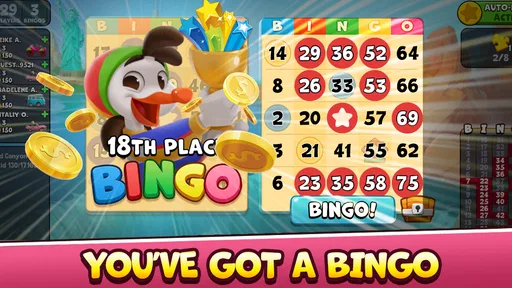
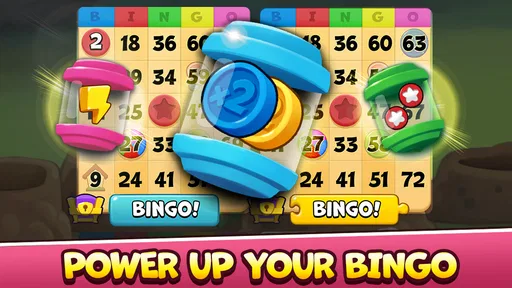





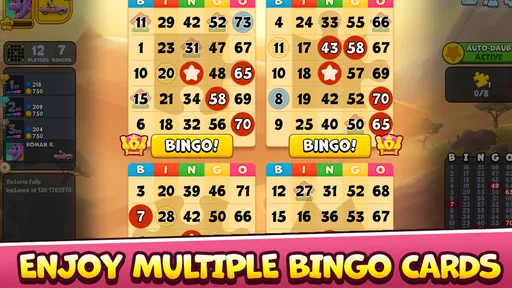
 Analysis by AppCompare
I like bingo best when it gives me something to focus on without demanding a long learning curve, and that is where Bingo Drive: Fun Bingo Games makes its case. It takes the familiar pattern of marking called numbers and wraps it in a more colorful, travel-themed presentation. The result feels livelier than a bare digital bingo card, though it is still a chance-based game at heart. I’d recommend it to someone who wants quick, casual sessions and a little variety, rather than to a player looking for deep strategy or a quiet, traditional hall experience.
That distinction matters before you install it. This is a free board game from Gliding Deer, and its broad appeal is reflected in an average rating of 4.6 from around 21,000 ratings, with more than a million installs. It is rated for Everyone and has been available since November 2016. Those details make it easy to approach, but the best reason to try it is more personal: the familiar rules help me settle in quickly, while the presentation gives each session a sense of occasion.
A familiar game with a more playful rhythm
First things first, Bingo Drive is not your grandma’s bingo. While it retains the core elements of the traditional game, it adds a layer of excitement with its colorful themes and interactive features. Once you open the app, you're greeted with a lively interface that feels inviting and easy to navigate. It doesn’t take long to get the hang of things, which is a huge plus if you’re not tech-savvy.
What really sets this game apart is its variety of bingo rooms. Each room offers a unique theme and set of rules, so you’re not just playing the same game over and over. From the classic bingo halls to more exotic destinations, you can travel the world without leaving your couch. It’s like having a mini vacation every time you play!
Small choices that make repeat rounds feel less routine
Now, let’s talk about one of my favorite features: customizable bingo cards. You can change the appearance of your cards with different designs, which adds a personal touch to your gaming experience. As you play, you earn coins and bonuses that can be used to unlock even more options. It’s these little details that make the game feel fresh and engaging.
And don’t get me started on the power-ups! These nifty tools can be used to boost your chances of winning. Whether it’s a daub hint or a magic boost to clear your card, these power-ups add a strategic layer to the gameplay. It’s all about knowing when to use them to maximize your winnings.
For a better run, I’d treat those boosts as limited resources rather than tapping them whenever a round gets tense. A hint is most useful when several calls arrive close together and I need help keeping track; spending help simply because it is available can make later rounds feel more dependent on boosts. The same goes for coins and bonuses: I would first see what normal play earns before deciding whether a particular card look or extra is worth pursuing. That small pause helps keep the game’s progression enjoyable instead of turning every session into a shopping decision.
Worth Reading Before You Choose

EA SPORTS FC Mobile 26 Is a Bigger Football Game, but It Takes Time

Flipboard Shows What News Apps Must Do Beyond the Feed

Switching to Android Auto Means Rethinking Your Driving Routine

Google Calendar Makes a Crowded Week Easier to Manage

Ludo King Makes the Most of the Minutes Between Plans

Baby Panda World Brings Quick Play to Modern Phones, but Its Game Library Feels Busy
Playing alongside other people
If you’re a social butterfly, you’ll appreciate the community aspect of Bingo Drive. The app allows you to connect with friends and other players worldwide. You can chat, send gifts, and even team up for special events. It’s a fantastic way to make new friends who share your passion for bingo.
The social aspect is well-integrated into the game, making it simple to invite friends or join existing groups. And let’s be real, everything is more fun with friends, right?
This social layer is a better fit for players who enjoy having a shared activity than for anyone who wants bingo to be entirely solitary. I’d use it as a light way to keep in touch with a friend who already plays, rather than expecting it to replace a messaging app or create an instant real-life friendship. Chat and group play can make a familiar round feel more companionable, but the core appeal remains marking numbers; if conversation is the main thing you want, a dedicated social game will probably do more for you.
How it fits into an ordinary day
The practical sweet spot is a short break when you want something more engaging than scrolling but don’t have the time or mood for a complex game. I can picture opening it while waiting for a meal to finish or settling in after work for a few rounds. The room themes offer a change of scenery, and the familiar bingo format means I don’t have to relearn a new control scheme each time I return.
It is less suited to moments when I need to stay fully attentive elsewhere. Number calls and card marking ask for enough focus that playing while handling a task could lead to missed calls or a frustrating round. If I only have a few seconds to spare, a simple offline puzzle may be a better match; if I have a relaxed stretch and want a game with a clear rhythm, Bingo Drive makes more sense.
Graphics and sound
The graphics in Bingo Drive are a visual treat. The vibrant colors and detailed animations make each game feel like a feast for the eyes. It’s clear that a lot of thought went into the design to ensure that players have a visually pleasing experience.
The sound effects and background music are equally well done, adding to the overall ambiance without being overpowering. It’s the perfect balance that keeps you engaged without feeling overwhelmed.
For shared spaces, I’d check the sound before starting a round and lower it if I’m near someone who wants quiet. The visual cues help give the game character, but a player who prefers a plain card and minimal animation may find this presentation busier than necessary. Traditional bingo apps often put the number board first and keep decoration secondary; here, the themed rooms and lively look are part of the attraction. That is a genuine preference difference, not a flaw everyone will notice in the same way.
Free to start, with spending to keep in mind
Now, let’s address the elephant in the room: in-app purchases and ads. Like many freemium games, Bingo Drive offers in-app purchases for coins, power-ups, and other goodies. While it’s entirely possible to enjoy the game without spending a dime, the option is there if you want to enhance your experience.
Ads are present but not intrusive. They mostly appear as optional videos that offer rewards for watching. It’s a fair trade-off if you ask me, as these rewards can give you a nice boost in the game.
The purchase range runs from $0.99 to $399.99 per item, so I would be deliberate about any checkout, especially if the phone is shared with a child. The age rating is Everyone, but that does not mean every player will want access to in-app spending. I’d make a simple personal rule before playing: enjoy the free rounds first, and only consider an optional purchase if I understand what it gives me and genuinely want it. Reward videos can be convenient, but I wouldn’t treat watching ads as a requirement for having a good time.
One practical question is whether a player can enjoy the game without buying anything: yes, the free-to-play structure allows that, though purchases are available for players who want extra in-game items. Another is whether it suits children: its Everyone rating makes it broadly accessible, but adults should still supervise spending choices on a shared device. If you prefer games with no optional purchases or ad-supported rewards, a paid one-time game or a simple offline bingo app will likely feel cleaner.
Who will enjoy it most
I’d point casual bingo fans toward this one if they like themed rooms, a bit of collection and progression, and the option to play socially. It is also approachable for someone who has never used a bingo app: the basic idea is familiar, and the interface is designed to be easy to pick up. The current version is 3.11.03 and requires Android 7.0 or later, which gives Android users a straightforward compatibility check before they download.
On the other hand, I would steer away anyone who wants a strictly traditional bingo experience, dislikes bright visual effects, or is uncomfortable with games that mix free play, ads, and purchasable extras. It also won’t satisfy someone who expects skill to outweigh luck; power-ups create small decisions, but bingo remains unpredictable. For a quieter alternative, a stripped-back bingo game is likely better. For deeper tactical play, I’d choose a board game built around deliberate choices instead.
Why I’d give it a try—and when I wouldn’t
So, is Bingo Drive: Fun Bingo Games worth a download? Absolutely! Whether you’re a seasoned bingo player or a newcomer looking for some casual fun, this app offers something for everyone. It’s entertaining, engaging, and a great way to unwind after a long day. So go ahead, give it a spin, and let the bingo adventures begin!
My recommendation is a little more specific: try it if the idea of themed bingo rooms and light social play sounds appealing, and approach the optional spending at your own pace. I wouldn’t choose it for a silent, no-frills game or for a session where I need to divide my attention. But as an easy-to-learn way to turn a spare half hour into a lively run of bingo, it has a clear identity and enough variety to make returning feel worthwhile.
Pros
- Engaging graphics and animations.
- Frequent updates with new content.
- Offers free daily bonuses.
- Variety of bingo rooms and themes.
- Easy to navigate interface.
Cons
- In-app purchases can be pricey.
- Requires internet connection.
- Ads can be frequent.
- Slow load times occasionally.
- Limited offline features.
FAQs for Bingo Drive: Fun Bingo Games
What is Bingo Drive: Fun Bingo Games?
Bingo Drive: Fun Bingo Games is a mobile app that offers a unique twist on traditional bingo. It combines classic bingo gameplay with exciting power-ups, unique themes, and engaging challenges. Available on both Android and iOS, it provides players with a dynamic and colorful gaming experience.
Is Bingo Drive free to play?
Yes, Bingo Drive is free to download and play. However, it offers in-app purchases for various items and power-ups that can enhance your gameplay experience. These purchases are optional and can be disabled in your device settings if you prefer to play without spending money.
What features does Bingo Drive offer?
Bingo Drive includes a variety of features such as multiple bingo rooms with unique themes, daily bonuses, and special events. Players can enjoy power-ups and collectibles that add an extra layer of excitement. The game also supports social interaction, allowing you to play with friends or meet new people.
How can I earn rewards in Bingo Drive?
Players can earn rewards through various methods including completing bingo rounds, participating in daily challenges, and collecting bonuses. The game also offers special events and missions where players can earn extra rewards, such as coins and power-ups, enhancing the overall gameplay experience.
Is an internet connection required to play Bingo Drive?
Yes, an internet connection is required to play Bingo Drive as it enables real-time multiplayer capabilities and access to the latest updates and events. The online connectivity allows you to interact with other players and participate in global leaderboards, enhancing the social aspect of the game.


